Install with Helm
For a platform engineer with a Kubernetes cluster: at the end, Agent Kourier runs from the published Helm chart and answers a mention in a Slack thread.
On Microsoft Teams, or for webhooks (both experimental, 0.6.0 or later), this guide gives the chart, and
Configure Microsoft Teams or Start agents from webhooks the connection. Take
Choose the route, The release, the CRDs and the two-step install of
Install on custom resources, the Binding's token Secret in
Create the Secrets, and Install behind an egress proxy if your cluster
needs one. Skip what is Slack's: the Slack app in Before you start, the Slack ChatConnection that init, the
team's file and the starter file write, the Secret slack, and Check it, which mentions the bot in Slack.
The checks below are the ones that catch the usual problems. You do not need an agent for the first install. Without one, Agent Kourier connects to Slack and tells the thread it cannot reach the agent. That reply proves Slack in, Slack out, the volume and the policies, and leaves the agent as the only thing to wire.
Before you start
- A Kubernetes cluster whose nodes can pull from
ghcr.io, and a namespace for Agent Kourier. The image is public, so the nodes need no pull Secret. - A Slack app with a bot token and an app-level token, invited to a channel: see Configure Slack.
helm, which pulls the chart from an OCI registry, andkubectl.- For custom resources, the chart's default route: Kubernetes 1.33 or later, and a right to create CustomResourceDefinitions (they are cluster-scoped), or an administrator who applies them once (Apply the CRDs yourself).
- For the check before you install a ConfigMap:
yq, anddockerto run the image.
Choose the route
Agent Kourier reads its ChatConnection, AgentBackend and Binding resources from one of two places, and the chart's default is the first.
- Custom resources (
config.source: crds, the default) are the route to run on Kubernetes. The chart installs the CRDs and the broker, and you apply the three resources withkubectlor a GitOps tool, so that each team can own its Bindings and see what became of them inkubectl get akbinding. It needs Kubernetes 1.33 or later.agent-kourier initwrites the files of this route for a broker with no Slack app of its own, which serves the team's. - A ConfigMap (
config.source: files) is the quick route for a proof of concept. The chart writes the resources of your values file into a ConfigMap, which needs no CRDs, no cluster-scoped right and no minimum version. The starter file below is for this route, andagent-kourier init --source fileswrites it.
Choose a config route says how they differ when something is wrong.
The release
Each release publishes a Helm chart and a container image for linux/amd64 and linux/arm64 to GHCR:
| Artifact | Reference |
|---|---|
| Chart | oci://ghcr.io/agentkourier/charts/agent-kourier, version 0.7.0 |
| Image | ghcr.io/agentkourier/agent-kourier:v0.7.0 |
The chart pins the image by digest, so you set no image values to install it. The GitHub Release of each version names both digests.
From release 0.4.0 on, each release also publishes the images of two recipes' agents, tagged with the release:
ghcr.io/agentkourier/agent-kourier-prompt-agent and ghcr.io/agentkourier/agent-kourier-echo-agent. The GitHub
Release names their digests too.
Verify the release
The release workflow signs the image and the chart with cosign, keyless, as itself. To check a signature, take the digest from the GitHub Release and name the workflow's exact identity:
cosign verify ghcr.io/agentkourier/agent-kourier@sha256:<image digest> \
  --certificate-oidc-issuer https://token.actions.githubusercontent.com \
  --certificate-identity https://github.com/agentkourier/agent-kourier/.github/workflows/release.yml@refs/tags/v0.7.0
The chart is ghcr.io/agentkourier/charts/agent-kourier@sha256:<chart digest>, checked the same way, and so are the
agent images.
Write the files with init
agent-kourier init writes the files of a first install with your values in them. By default they are the files of
the recorded path for a broker with no Slack app of its own: the team brings its own app, and
the broker serves the ChatConnections of every namespace, the team's included. It writes two files:
my-values.yaml, the platform team's values: comments only, and no key, so the chart renders a broker with noconfig.chatConnectionthat serves the ChatConnections of every namespace. The comments showconfig.connectionNamespaceswith the team's namespace in it, andconfig.connectionNamespaceSelector, commented out, for a platform that serves fewer.<team>.yaml, named after the team's namespace, the team's resources, all in that namespace: the ChatConnection<team>-slackfor the team's app, which reads the Secret<team>-slack; the AgentBackendagent; and the Bindingmy-binding, which names the two.
<team>.yaml goes in the directory of my-values.yaml (--out). With --source files it writes the one values file of
the ConfigMap route instead, in the shape of the starter file, on the broker's own Slack app,
and asks for no team namespace.
It asks for the agent's dialect (a2a or kagent-v1), URL and namespace, the team's namespace (the agent's when you press Enter), the agent's
name and the channel, and then, if it asked any of these and you did not give --agent-token, whether the agent verifies tokens. Before it
writes, it loads the team's file with the broker's file loader, which defaults and validates each object as the broker does, and resolves the
Binding's references to the ChatConnection and the AgentBackend; it takes the Secrets as present. With --source files it loads what the chart
would render from the values. It writes nothing if the check fails, and it overwrites neither file unless you pass --force, which overwrites
only regular files.
Then it prints the commands of the recorded path with your names in them. As the platform team:
create the release's namespace and install the chart. As the team: create the Secret of the team's app from a file that holds botToken= and
appToken= lines, create a Role and RoleBinding that grant it to the broker's ServiceAccount (agent-kourier, the chart's for the release
agent-kourier), and apply the team's file. The commands create no team namespace: it must exist. Like the recorded path, they leave out the
Roles that let the team write its ChatConnection (step 1)
and its AgentBackend and Binding (Let a team add its own Binding); a team that is not a cluster administrator needs them
first. They are the commands of Install on custom resources below: run them, then go to
Check it.
Releases before 0.1.3 do not have init, and releases up to 0.3.1 write only the ConfigMap route, as --source files does now, and have no
--team-namespace. Release 0.3.2 writes config.connectionNamespaces with the team's namespace into my-values.yaml instead of comments
only, so the broker it installs serves that namespace alone. Run the image of the release you install, in the directory that should get the files. -it
lets it ask its questions, and --user runs it as you, so it can write the files into your directory (the image's own user is 65532):
docker run --rm -it --user "$(id -u):$(id -g)" -v "$PWD:/work" -w /work \
  ghcr.io/agentkourier/agent-kourier:v0.7.0 init
The helm install command it prints names the chart version of the image's release. From a checkout of this repository,
go run ./cmd/agent-kourier init --out <dir>/my-values.yaml runs the same command, with <dir> a directory that exists (init creates none;
the team's file goes beside the values file). A build that is not a release has no chart version to name, so the command it prints has no
--version, and Helm takes the newest chart.
Every question has an option, so the same run needs no terminal. Give the channel by ID, or by name when a bot token is set:
docker run --rm --user "$(id -u):$(id -g)" -v "$PWD:/work" -w /work \
  ghcr.io/agentkourier/agent-kourier:v0.7.0 init --dialect a2a \
  --agent-url http://my-agent.team-a.svc.cluster.local:8083/a2a/ \
  --agent-namespace team-a --team-namespace team-a --agent-name my-agent --channel C0123456789
With the bot token of the app the Binding uses (the team's, by default) in SLACK_BOT_TOKEN (exported, and passed with -e SLACK_BOT_TOKEN)
or in a file named by --token-file (mounted into the container), init also looks a channel name up and checks that the bot can read the
channel, as the dry run does. Without a token it skips Slack, says so, and needs the channel's ID. Add
--agent-token if the agent verifies tokens: the Binding then reads the token from the Secret agent-kourier-agent-token in the Binding's
namespace (the team's, or the release's with --source files; Create the Binding identity says where the
token comes from), and init prints the command that creates it there and, on custom resources,
names it in the team's Role too. The options are in Command line and environment.
Install on custom resources
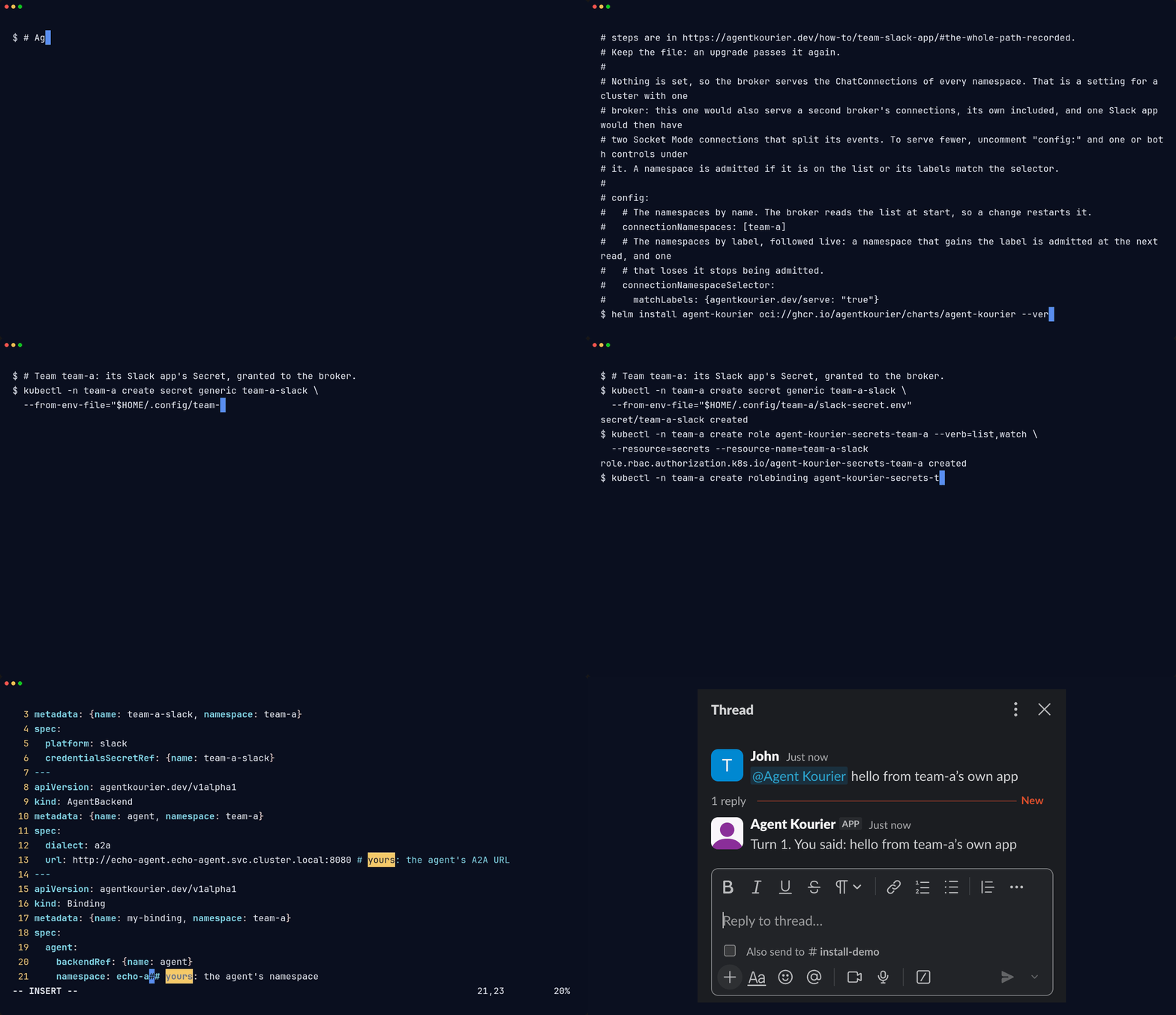
The steps below, recorded on a kind cluster with the echo agent, a plain A2A agent with no model, as the team's agent. The recording leaves out the server-side dry run. The wait for the Binding to turn Ready, about 25 seconds here, is cut.
The chart installs the CRDs and the broker, and you apply the resources. They are two steps because a release that renders the CRDs and
resources of them fails in its first apply (Helm cannot map a kind that is not yet served), so the chart refuses to render
config.chatConnections, config.agentBackends or config.bindings as custom resources into a release that is installing their CRDs. A release with none of them renders no custom resource, and installs the CRDs itself.
This install is a broker with no Slack app of its own: a team brings its own app and keeps everything of it in its namespace, team-a here,
which must exist. That is the app's Secret, the ChatConnection that reads it, the AgentBackend and the Binding.
Let a team bring its own Slack app says what that gives the team and the platform. The commands run as a cluster
administrator. A team that is not one first needs the Roles that let it write its ChatConnection
(step 1) and its AgentBackend and Binding
(Let a team add its own Binding). agent-kourier init
writes these files with your names in them.
The platform team's values file holds comments only. With no ChatConnection of its own, no list of namespaces and no selector, the chart
sets none of config.chatConnection, config.connectionNamespaces and config.connectionNamespaceSelector, and the broker serves the
ChatConnections of every namespace. To serve team-a alone, uncomment config: and connectionNamespaces. To admit by label, uncomment config: and connectionNamespaceSelector with its matchLabels line:
# A first install of the Agent Kourier Helm chart on custom resources, the chart's default route, for a broker
# with no Slack app of its own: it serves the ChatConnections that teams make in their namespaces with their own apps.
#
# Written by "agent-kourier init", with team-a.yaml beside it, which the team applies once the chart is installed. The
# steps are in https://agentkourier.dev/how-to/team-slack-app/#the-whole-path-recorded.
# Keep the file: an upgrade passes it again.
#
# Nothing is set, so the broker serves the ChatConnections of every namespace. That is a setting for a cluster with one
# broker: this one would also serve a second broker's connections, its own included, and one Slack app would then have
# two Socket Mode connections that split its events. To serve fewer, uncomment "config:" and one or both controls under
# it. A namespace is admitted if it is on the list or its labels match the selector.
#
# config:
#   # The namespaces by name. The broker reads the list at start, so a change restarts it.
#   connectionNamespaces: [team-a]
#   # The namespaces by label, followed live: a namespace that gains the label is admitted at the next read, and one
#   # that loses it stops being admitted.
#   connectionNamespaceSelector:
#     matchLabels: {agentkourier.dev/serve: "true"}
kubectl create namespace agent-kourier
helm install agent-kourier oci://ghcr.io/agentkourier/charts/agent-kourier --version 0.7.0 \
  -n agent-kourier -f my-values.yaml
The pod starts and is ready with no ChatConnection to serve. The chart's ClusterRole lets the broker list and watch the three kinds in every
namespace, but with these values the chart grants no Secret in team-a: the team grants its own. It makes the Secret of its app from a file that only you can read,
with the lines botToken=<bot token> and appToken=<app-level token>, and a Role and RoleBinding that let the broker's ServiceAccount
(agent-kourier in agent-kourier, the chart's for the release agent-kourier) list and watch that one Secret:
kubectl -n team-a create secret generic team-a-slack \
  --from-env-file="$HOME/.config/team-a/slack-secret.env"
kubectl -n team-a create role agent-kourier-secrets-team-a --verb=list,watch \
  --resource=secrets --resource-name=team-a-slack
kubectl -n team-a create rolebinding agent-kourier-secrets-team-a --role=agent-kourier-secrets-team-a \
  --serviceaccount=agent-kourier:agent-kourier
The team's file holds its ChatConnection, its AgentBackend and its Binding, all in team-a, the connection first. The team can commit it next
to its agent's manifests. Change its four lines marked yours:
apiVersion: agentkourier.dev/v1alpha1
kind: ChatConnection
metadata: {name: team-a-slack, namespace: team-a}
spec:
  platform: slack
  credentialsSecretRef: {name: team-a-slack}
---
apiVersion: agentkourier.dev/v1alpha1
kind: AgentBackend
metadata: {name: agent, namespace: team-a}
spec:
  dialect: a2a
  url: http://my-agent.team-a.svc.cluster.local:8083/a2a/ # yours: the agent's A2A URL
---
apiVersion: agentkourier.dev/v1alpha1
kind: Binding
metadata: {name: my-binding, namespace: team-a}
spec:
  agent:
    backendRef: {name: agent}
    namespace: team-a # yours: the agent's namespace
    name: my-agent # yours: the agent's name
  identity:
    userId: agent-kourier
  chat:
    connectionRef: {name: team-a-slack}
    channel: C0123456789 # yours: the channel's ID (starts with C), not its name
    output: live
  interactions: {askUser: false}
kubectl apply --dry-run=server -f team-a.yaml
kubectl apply -f team-a.yaml
kubectl -n team-a get akbinding
If the agent verifies tokens, add tokenSecretRef: {name: agent-kourier-agent-token} under identity in the Binding, create that Secret in
team-a (Create the Secrets says where the token comes from), and name it in the team's Role too, with a second
--resource-name=agent-kourier-agent-token.
The dry run asks the API server to check each object against the CRDs' schema, and names the field of a refusal. The checks that only the broker makes show afterwards in the Binding's status: Check that it worked reads it. Then go to Check it.
If the chart refuses with config.source crds needs Kubernetes 1.33 or later, the cluster is older: install the ConfigMap route below, which has no minimum.
An installer that may not create CRDs sets crds.install: false (unset, it is true with custom resources), and an administrator applies them first. So does a second broker in the same cluster: the CRDs are
the first release's, and a second release that renders them is refused by Helm (invalid ownership metadata).
A broker with a Slack app of its own
The broker can instead have a Slack app of its own, the platform's, which answers for each team whose Binding names its ChatConnection.
Create the release's namespace and the app's Secret slack first, as Create the Secrets below says. The values name
the ChatConnection as namespace/name:
The chart cannot read the resources you apply yourself, but it knows which connection the broker serves, so it makes a Role in that
connection's namespace that grants list and watch on one Secret by name: the Secret that has the connection's name (slack here). Without
that Role the broker could not read the Secret and would exit with code 3 in a loop. If the ChatConnection's credentialsSecretRef names
another Secret, set config.chatConnectionSecret to that name. The pod exits with code 2 and restarts until the ChatConnection it is told to
serve exists (ChatConnection agent-kourier/slack was not found), and starts at the first restart after it does, which Kubernetes makes by
itself.
The platform team's file holds the shared ChatConnection and AgentBackend, in the release's namespace. Each lists the team's
namespace in allowedNamespaces, without which a Binding of another namespace may not name it. Change its three lines marked yours:
apiVersion: agentkourier.dev/v1alpha1
kind: ChatConnection
metadata:
  name: slack
  namespace: agent-kourier
spec:
  platform: slack
  credentialsSecretRef: {name: slack}
  allowedNamespaces: [my-team] # yours: the team's namespace
---
apiVersion: agentkourier.dev/v1alpha1
kind: AgentBackend
metadata:
  name: agent
  namespace: agent-kourier
spec:
  dialect: a2a
  url: http://my-agent.my-team.svc.cluster.local:8083/a2a/ # yours: the agent's A2A URL
  allowedNamespaces: [my-team] # yours: the team's namespace
The team's file holds its Binding, in the team's own namespace (here the agent's), naming the two by namespace. Change its four lines marked yours:
apiVersion: agentkourier.dev/v1alpha1
kind: Binding
metadata:
  name: my-binding
  namespace: my-team # yours: the team's namespace
spec:
  agent:
    backendRef: {name: agent, namespace: agent-kourier}
    namespace: my-team # yours: the agent's namespace
    name: my-agent # yours: the agent's name
  identity:
    userId: agent-kourier
  chat:
    connectionRef: {name: slack, namespace: agent-kourier}
    channel: C0123456789 # yours: the channel's ID (starts with C), not its name
    output: live
  interactions: {askUser: false}
helm install agent-kourier oci://ghcr.io/agentkourier/charts/agent-kourier --version 0.7.0 \
  -n agent-kourier -f my-values.yaml
kubectl apply --dry-run=server -f platform.yaml -f team.yaml
kubectl apply -f platform.yaml
kubectl apply -f team.yaml
kubectl get akbinding -A
If the agent verifies tokens, add tokenSecretRef: {name: agent-kourier-agent-token} under identity in the Binding, and create that Secret
in my-team (Create the Secrets). The chart's Role covers the one Secret slack. The token Secret is in no value the
chart reads, so nothing grants it: the team grants it with a Role of its own that names it, as
Let a team add its own Binding shows, or the platform with rbac.secretNames, a map of
namespace to Secret names, and a helm upgrade with the values:
A broker with an app of its own can serve teams' apps too, with config.connectionNamespaces (by name) or config.connectionNamespaceSelector
(by label) beside config.chatConnection (Let a team bring its own Slack app).
With neither, it serves its own connection alone. Then go to Check it.
Create the Secrets
The ConfigMap route, and a broker with a Slack app of its own, read the broker's app from a Secret in the release's namespace. On custom resources as above, the team makes its app's Secret in its namespace instead, and needs only the token Secret below.
Create the namespace first. A sealed secret is bound to its namespace and name, so it cannot be applied before the namespace exists.
The ChatConnection's Secret holds two keys with exactly these names. It is named slack, like the ChatConnection, so that on custom
resources the Role the chart makes names it:
kubectl -n agent-kourier create secret generic slack \
  --from-literal=botToken="$SLACK_BOT_TOKEN" \
  --from-literal=appToken="$SLACK_APP_TOKEN"
If the agent, or a front door in front of it, verifies tokens, first
create the Binding identity and obtain its token from the accepted issuer.
Agent Kourier does not mint $AGENT_TOKEN; it is the issued bearer token. Store it in the Binding's namespace. On custom
resources the Binding is the team's and sits in the team's namespace (team-a above, my-team with an app of the broker's). For a Binding under the
chart's config, as on the ConfigMap route, it is the release namespace (agent-kourier here) unless the entry sets its
own namespace. The Dex example on that page stores its token itself, as payments-agent-token in payments; for this
install, change its last command to kubectl -n team-a create secret generic agent-kourier-agent-token (-n my-team with an app of the
broker's, -n agent-kourier on the ConfigMap route). With a token from any other issuer (-n my-team with an app of the broker's, and on the
ConfigMap route -n agent-kourier):
kubectl -n team-a create secret generic agent-kourier-agent-token --from-literal=token="$AGENT_TOKEN"
Tokens never go in the values file. The chart refuses a value that looks like a Slack token.
The ConfigMap route
Create the Secrets above, then Write the values, Check the values before you install and Install the chart
install the ConfigMap route, which the starter file and agent-kourier init --source files name with config.source: files. With files, crds.install is false unless you set it, so they install no CRDs.
Moving to custom resources later is the how-to's.
Write the values
The chart takes Agent Kourier's three resource kinds under config: the ChatConnection, the AgentBackend and the
Binding. They are nested, so they go in a values file rather than in --set flags. There are two ways to get one: let
agent-kourier init --source files write it (Write the files with init), or download the starter file and edit it.
Download the starter file
Download the starter file, a complete first install with an agent that does not exist yet:
curl -fsSLo my-values.yaml https://raw.githubusercontent.com/agentkourier/agent-kourier/main/examples/helm/my-values.yaml
It is this file. Change the four lines marked yours: the agent's URL, namespace and name, and the channel's ID, which
starts with C (G for an older private channel), not the channel's name. init --source files writes the same
resources with those four values filled in. The -f flags below pass it to Helm.
# A first install of the Agent Kourier Helm chart: one Slack connection, one agent and one channel.
#
#   curl -fsSLo my-values.yaml https://raw.githubusercontent.com/agentkourier/agent-kourier/main/examples/helm/my-values.yaml
#
# Change the four lines marked "yours", then install with -f my-values.yaml. The steps around it (the Secrets, a dry
# run that checks this file, the install) are in https://agentkourier.dev/how-to/install-with-helm/.
# Keep the file: an upgrade passes it again.
#
# This file is the quick route for a proof of concept: the chart writes the resources below into a ConfigMap. The chart's default,
# and the route to run on Kubernetes, reads them as custom resources instead (config.source crds), which other
# teams can add to; https://agentkourier.dev/explanation/config-routes/ says which to choose.
config:
  source: files
  # How Agent Kourier talks to Slack. The Secret holds the bot token and the app-level token under the keys botToken
  # and appToken, in the release's namespace.
  chatConnections:
    slack:
      spec:
        platform: slack
        credentialsSecretRef: {name: slack}

  # Where the agent is: its A2A endpoint, called exactly as written (keep a trailing slash if the route has one).
  agentBackends:
    agent:
      spec:
        dialect: a2a
        url: http://my-agent.my-namespace.svc.cluster.local:8083/a2a/ # yours: the agent's A2A URL

  # Which channel talks to which agent.
  bindings:
    my-binding:
      spec:
        agent:
          backendRef: {name: agent}
          namespace: my-namespace # yours: the agent's namespace
          name: my-agent # yours: the agent's name
        identity:
          # The identity Agent Kourier calls the agent as. If the agent verifies tokens, also set
          # tokenSecretRef: {name: agent-kourier-agent-token}, a Secret with the token under the key token.
          userId: agent-kourier
        chat:
          connectionRef: {name: slack}
          channel: C0123456789 # yours: the channel's ID (starts with C), not its name
          output: live
        interactions: {askUser: false}
Every field is in the Binding, AgentBackend and
ChatConnection references, and every chart value in Helm values.
helm show values oci://ghcr.io/agentkourier/charts/agent-kourier --version 0.7.0 prints the chart's defaults with their
comments. Keep the file: an upgrade passes it again.
Check the values before you install
The chart passes each resource's spec through as written, so helm lint and helm template accept a misspelt field
such as chanel:. Agent Kourier rejects it when it starts, and the pod restarts in a loop. agent-kourier dry-run
loads the same files with the same loader, so it finds those errors before you install. Render the files the chart
writes, with yq:
mkdir -p rendered
helm template agent-kourier oci://ghcr.io/agentkourier/charts/agent-kourier --version 0.7.0 \
  -n agent-kourier -f my-values.yaml --show-only templates/configmap.yaml |
  yq -r '.data[] | "---\n" + .' > rendered/resources.yaml
Then run the dry run from the released image, with the bot token in SLACK_BOT_TOKEN (exported) and the Binding
named as namespace/name:
docker run --rm -e SLACK_BOT_TOKEN -v "$PWD/rendered:/config:ro" \
  ghcr.io/agentkourier/agent-kourier:v0.7.0 dry-run --config /config --binding agent-kourier/my-binding
An error that starts agent-kourier dry-run: load /config: names the file, the resource and the field. The files load
before the token is read, so without a token the dry run still checks them, and then stops at no bot token. With one,
it reads the Binding's channel, and it exits 1 if Slack rejects the token. It does not check references between
resources or the Secrets: those errors show only when the pod starts. Reading the rest of its output is in
Tune triggers with a dry run.
This checks the files of the ConfigMap route. With custom resources (config.source: crds, the default) the chart renders no ConfigMap and the
resources are objects: check each against the CRDs' schema with kubectl apply --dry-run=server -f <file>, which names the field of a
refusal, as above. The checks that only the broker makes show afterwards, in the Binding's status
(Move the config between a ConfigMap and custom resources).
Install the chart
helm install agent-kourier oci://ghcr.io/agentkourier/charts/agent-kourier --version 0.7.0 \
  -n agent-kourier -f my-values.yaml
The defaults run one replica with SQLite on a 1 GiB volume. For Postgres and a standby, see Run two replicas (high availability).
The starter file names config.source: files, so this install reads the resources from a ConfigMap and installs no CRDs. To run on custom resources
instead, so that other teams write their own Bindings, use Install on custom resources for a new install, and
Move the config between a ConfigMap and custom resources on a running one; Choose a config route says when that is worth it.
If the nodes may pull only from your own registry, copy the image there by digest and pass
--set image.repository=<registry>/<repo>/agent-kourier. The chart keeps its pinned digest, so the copy must have the
same one.
NetworkPolicy on Cilium
If you turn on networkPolicy on a cluster that runs Cilium, add the policy in
The pod exits with code 4 first. Without it
the pod cannot reach the API server and never starts.
Install behind an egress proxy
Agent Kourier reads the standard proxy variables (HTTPS_PROXY, HTTP_PROXY, NO_PROXY, in upper or lower case) in some of its connections and not in others. Set them in
extraEnv when the cluster reaches Slack through a proxy:
extraEnv:
  - name: HTTPS_PROXY
    value: http://proxy.example.com:3128   # a proxy that needs a login: build the URL in a Secret and use valueFrom.secretKeyRef
  - name: NO_PROXY
    value: 10.96.0.1,.svc,.cluster.local   # the kubernetes Service's cluster IP, as below, and the in-cluster domains
| Connection | Uses the proxy variables |
|---|---|
| Slack Web API calls and the Socket Mode websocket | Yes |
| The Kubernetes API server: the Secret and custom resource informers, status writes and the leader Lease | Yes |
OTLP trace export, when OTEL_EXPORTER_OTLP_ENDPOINT or OTEL_EXPORTER_OTLP_TRACES_ENDPOINT is set |
Yes |
Agents: the card, calls and streams to an AgentBackend's url |
No. The connection is made directly, on purpose, so that an environment variable cannot redirect a Binding's token |
| The database | No |
What to put in NO_PROXY:
- The Kubernetes API server. The broker dials the address in
KUBERNETES_SERVICE_HOST, which Kubernetes sets in every pod: the cluster IP of thekubernetesService in thedefaultnamespace (kubectl -n default get service kubernetes), not the control plane's own address. Put that IP, or the cluster's service CIDR, inNO_PROXY; a CIDR is read by both the Kubernetes client and Go's own proxy code. Without it the broker's requests to the API server go to the proxy. If the proxy does not carry them, the pod exits with code 4, at the latest when its sync wait (AGENTKOURIER_SYNC_TIMEOUT, 30 seconds by default) ends: the Secret caches never sync, and onconfig.source: crdsthe first list of the custom resources fails as soon as the proxy refuses the connection. See the pod exits with code 4 (read from the clients' code and not run through a proxy here). - An in-cluster OTLP collector. Add its domain suffix (
.svcand.cluster.localabove), or the spans go to the proxy. - Agents need no entry. They never go to the proxy, so a
NO_PROXYrule changes nothing for them. An agent that is reachable only through a proxy needs a reverse proxy that its AgentBackend'surlnames.
With networkPolicy.enabled, egress to the proxy's address has to be allowed in networkPolicy.extraEgress, and networkPolicy.slack.cidrs can then be narrowed to []
(see networkPolicy). Narrowing it removes the only rule that allows port 443 to public addresses, and agents never use
the proxy, so an AgentBackend at a public address then needs an extraEgress rule of its own. The policy's networkPolicy.kubeApiServer rule still has to name the control plane's addresses, since the policy sees them after the Service's translation.
Check it
A healthy start logs these lines, in this order (a broker with no connection of its own logs serving a ChatConnection after ready, where it can come after the first slack: line):
config route
config reloaded
serving a ChatConnection
opened the store
ready
slack: socket mode connecting
slack: socket mode websocket opened
slack: socket mode connected
config route is the first line, and it is how the log says which of the two routes the broker reads: its config_source field is
crds or files. With crds and an own connection it also has a connection field, the namespace/name of the ChatConnection the broker is set to serve
(AGENTKOURIER_CHAT_CONNECTION), and the later serving a ChatConnection line confirms that the cluster has it. With crds it also has a
connection_admission field, which says whose ChatConnections the broker serves besides its own: all (every namespace: no own connection, no list
and no selector, or a selector of {}), list (AGENTKOURIER_CONNECTION_NAMESPACES), selector (AGENTKOURIER_CONNECTION_NAMESPACE_SELECTOR),
list+selector, or own (none: its own connection alone). With a list there is a connection_namespaces field with the namespace names,
comma-joined, and with a selector other than {} a connection_namespace_selector field with the selector in Kubernetes' text form, such as
agentkourier.dev/serve=true. A broker with no own connection has no connection field,
and serving a ChatConnection is logged each time it starts a team connection, after ready, since the leader starts them. With files there is no connection field: the one
ChatConnection of the directory is named by serving a ChatConnection alone. The line is logged at info: at the default level, the log of a container that has just started and has no config route line is from a release older than the one that added it. With logLevel: warn or error no start line is shown, and a log that kubelet has rotated no longer has its first lines. The order of the first five lines is read from the code and was checked, on both
routes, against the broker started with a fake cluster; the three slack: lines were not re-run against a cluster for this page.
ready means the config loaded and the store opened. It does not mean Slack connected: wait for the last line. It
carries a num_connections field, the number of connections open on the app token. A value above 1 on a fresh start
is worth a look.
Then mention the bot in the channel. With no agent, the first failed send is retried silently; after the second the thread gets "I can't reach the agent
right now, and I'm trying again." If the agent stays unreachable the turn eventually fails with "This request failed,
and I won't try it again." The log shows session turn started and then session turn failed, with the reason in
error.
Now connect a real agent. If you have none yet, start with the docs-agent recipe: a plain A2A agent
that runs on any cluster, with no kagent. To connect your own: kagent,
any A2A agent, or an add-on the chart runs: the AX agent on Amazon Bedrock or the Anthropic API or
Claude Managed Agents.
Stop it and keep the data
Set replicaCount: 0. Agent Kourier stops, and the volume stays.
On helm uninstall the chart keeps the claim by default: persistence.retainOnUninstall: true sets
helm.sh/resource-policy: keep on it. A GitOps tool may not honour that annotation when it prunes, and that
behaviour is not guaranteed. If the data matters, create the claim yourself and set persistence.existingClaim, so no
release owns it, and stop with replicaCount: 0 rather than by removing the app.
The CustomResourceDefinitions that crds.install renders are kept on helm uninstall the same way (helm.sh/resource-policy: keep), and that too is
Helm's guarantee only. Under Argo CD with prune, turning crds.install off, or deleting the Application, may delete the CRDs, and deleting a CRD deletes every
Binding, AgentBackend or ChatConnection of that kind in the cluster, which is every team's. The chart renders argocd.argoproj.io/sync-options: Prune=false,Delete=false
on each CRD, which Argo CD's documentation says stops that. This is unverified: Argo CD has not been run against this chart. A tool other than Helm or Argo CD needs its own way to be told to leave them,
or have the CRDs applied outside what it prunes (see Apply the CRDs yourself).
Build from source
For a change that is not in a release yet. You need a checkout of this repository and docker.
make image builds the production image, agent-kourier:dev, for the architecture of the Docker daemon that builds it.
If the nodes run another architecture, as amd64 nodes do when you build on an Apple silicon laptop, name theirs with
DOCKER_DEFAULT_PLATFORM. The Go build cross-compiles, so this needs no emulation. Then tag the image for your
registry and push it:
DOCKER_DEFAULT_PLATFORM=linux/amd64 make image   # the nodes' platform
docker image inspect --format '{{.Os}}/{{.Architecture}}' agent-kourier:dev
docker tag agent-kourier:dev <registry>/<repo>/agent-kourier:<tag>
docker push <registry>/<repo>/agent-kourier:<tag>
- Push each build under a new tag. The chart's
image.pullPolicyisIfNotPresent, so a node that already has a tag runs what it has and does not pull a rebuild pushed under the same tag. - Many registries make tags immutable, which enforces the same thing.
The chart in the source tree has no image, and the render fails without one. Install it from the checkout with the image you pushed:
helm install agent-kourier ./charts/agent-kourier -n agent-kourier -f my-values.yaml \
  --set image.repository=<registry>/<repo>/agent-kourier --set image.tag=<tag>
To pin the image, pass --set image.digest=sha256:<digest> in place of the tag; a digest wins over a tag. To run the
dry run from the checkout without an image, use go run ./cmd/agent-kourier dry-run --config rendered ....
make release-image builds what the release workflow publishes, the images for both platforms with provenance and SBOM
attestations and the chart stamped with Agent Kourier's digest, and checks them, without pushing anything. The repository's
RELEASING.md covers it and how a release is cut.
Related
- Troubleshoot an install for the failures a first install runs into.
- Upgrade to a newer release.
- Export metrics and traces.
- Stored data for what Agent Kourier keeps and for how long.