Architecture
This page explains how Agent Kourier is put together: what it owns, what the agent runtime owns, and the path one conversation takes through the broker.
Agent Kourier connects declarative messaging bindings to agents deployed with a chosen runtime. The runtime hosts and executes the agents, and the agents own their tools and task logic. Agent Kourier owns the messaging connection, conversation lifecycle, and delivery state.
An agent that exposes a supported streaming A2A endpoint can connect through a Binding without adding Slack or
Microsoft Teams event handlers or reply formatting to the agent. A webhook connection takes another service's signed
webhooks instead, and posts nothing: the agent answers on that service with its own tools.
flowchart LR
    Chat["Slack or Microsoft Teams channel<br/>People and alert messages"]
    Service["Another service<br/>GitHub, Jira Cloud, any signed JSON webhook"]
    AgentKourier["agent-kourier<br/>Bindings, sessions, delivery"]
    Agents["A2A agents<br/>kagent, Google AX, any streaming A2A agent"]

    Chat <-->|Messages, answers| AgentKourier
    Service -->|Webhooks| AgentKourier
    AgentKourier <-->|A2A| Agents
    Agents -.->|its own tools| Service
The kagent path
A message from Slack becomes a turn in the session manager, which sends it to the agent through the kagent-v1
dialect. Every call goes through a front door that verifies the Binding's token; the controller port is never reached
directly. The answer streams back and is rendered into the thread, and durable posts go through the outbox.
flowchart TB
    Slack["Slack channel"]
    subgraph AK["Agent Kourier"]
        Intake["Slack adapter and chat intake"]
        Session["Session manager<br/>reply queue, turns, recovery"]
        Client["A2A client<br/>kagent-v1 dialect"]
        Render["Renderer and outbox"]
        Store[("SQLite or Postgres")]
    end
    Door["Front door<br/>verifies the Binding's token"]
    Ctrl["kagent controller"]
    Agent["kagent agent<br/>on Agent Substrate"]

    Slack -->|message| Intake
    Intake -->|queue a turn| Session
    Session <-->|task| Client
    Client <-->|A2A 1.0 and HITL extension| Door
    Door <--> Ctrl
    Ctrl <--> Agent
    Session -->|output, questions| Render
    Render -->|post, stream, edit| Slack
    Session <--> Store
    Render <--> Store

    classDef core stroke:#326CE5,stroke-width:3px
    class Session core
The Google AX path
The broker is the same. The agent behind the a2a dialect is the AX add-on, a launcher the chart
runs beside Agent Kourier. For each accepted turn it starts an AX Task from your template through AX's private gRPC
control plane. The Task runs your agent image through the result wrapper, which posts the command's output back to the
add-on over HTTPS through an AX Gateway; the Gateway adds the callback token outside the sandbox. The add-on returns the
result to Agent Kourier as the turn's A2A result: the output on success, a failure without it otherwise.
flowchart TB
    Slack["Slack channel"]
    subgraph AK["Agent Kourier"]
        Intake["Slack adapter and chat intake"]
        Session["Session manager<br/>reply queue, turns, recovery"]
        Client["A2A client<br/>a2a dialect"]
        Render["Renderer and outbox"]
    end
    Launcher["AX add-on<br/>A2A at /a2a and the result callback"]
    Control["AX control plane<br/>private gRPC"]
    Task["AX Task<br/>your agent image and the result wrapper"]
    Gateway["AX Gateway<br/>adds the callback token"]

    Slack -->|message| Intake
    Intake -->|queue a turn| Session
    Session <-->|task| Client
    Client <-->|A2A, caller token| Launcher
    Launcher -->|start, poll, delete| Control
    Control --> Task
    Task -->|output over HTTPS| Gateway
    Gateway -->|result callback| Launcher
    Session -->|output| Render
    Render -->|post, stream, edit| Slack

    classDef core stroke:#326CE5,stroke-width:3px
    class Session core
The whole map
The full map adds configuration, Secrets, interaction handling, telemetry and both runtimes in one picture. It is too large to read at page width: open it full size.
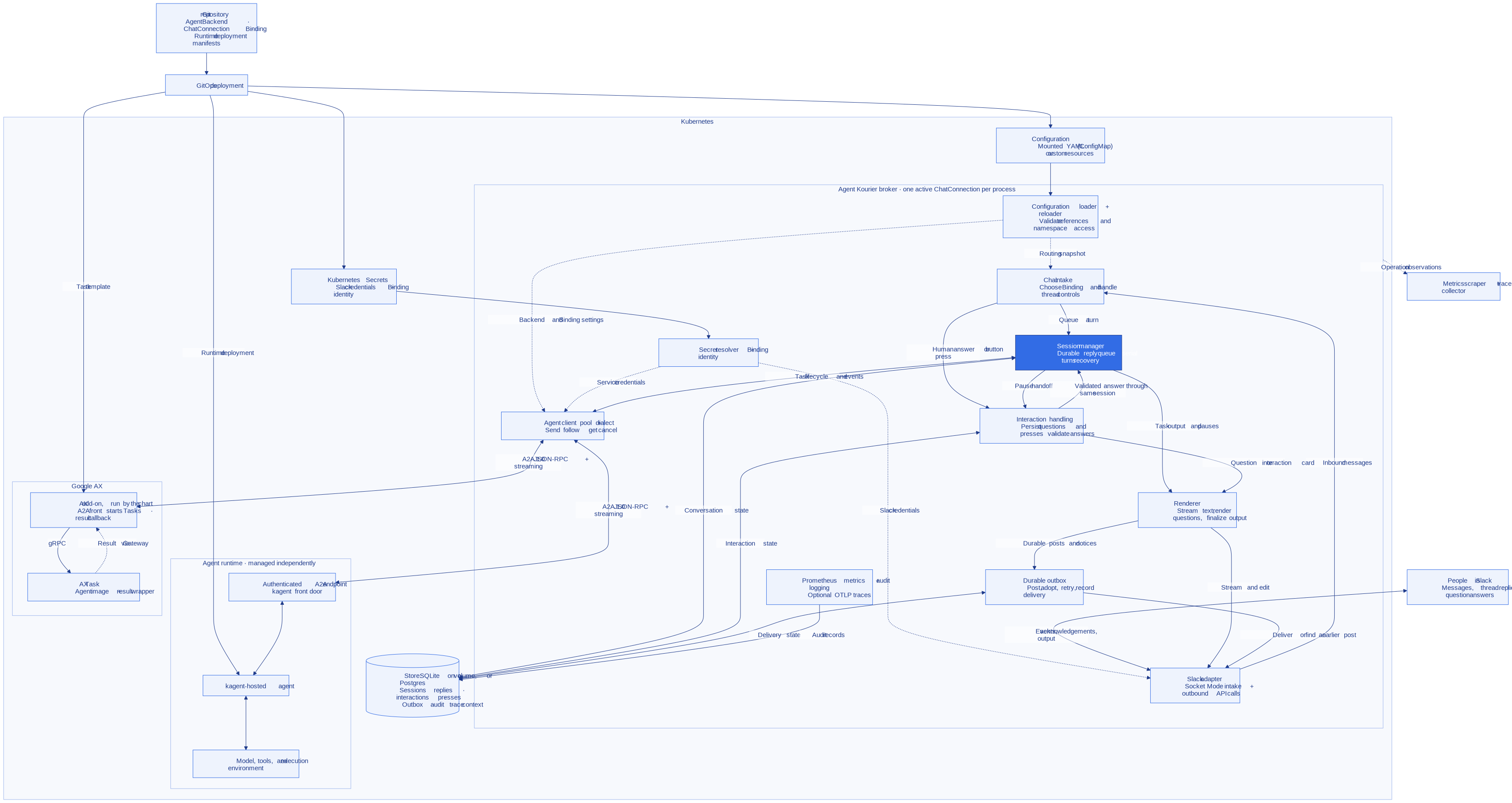
The full map. Select it to open it, and select it again to see it at full size and drag it; or open the SVG in a tab of its own.
In the full map, solid arrows show the configuration and conversation paths, and dotted arrows show configuration or credential inputs. The kagent and AX runtimes sit behind the same A2A client, and they differ only in dialect and in what the backend exposes.
Telemetry is shared across broker operations rather than a step in delivery. Audit records are durable in the store, and traces are exported only when configured.
Configuration and deployment
Agent Kourier reads three kinds of resource, ChatConnection, AgentBackend and Binding, from one of two places,
chosen when it starts:
- With the chart's
config.source: crds, its default, it reads the three kinds from the cluster as custom resources, one object at a time, so that teams can own their Bindings. There is no reconciliation controller, since the broker watches them itself, and the elected leader writes each Binding'sstatus. - With
config.source: files, the quick route for a proof of concept, it reads resource-shaped YAML files fromAGENTKOURIER_CONFIG_DIR. GitOps deploys them as a ConfigMap alongside Secrets, the Agent Kourier Deployment and persistent storage. The reloader validates changes and, if a reload fails, keeps the last accepted configuration.
The two routes are never merged. Choose a config route says how they differ.
Secret access uses Kubernetes RBAC. Cross-namespace resource references use configured namespace allowlists.
A broker serves its own ChatConnection, and with custom resources the ChatConnections of the namespaces the
platform team admits, up to 16 in all. See One ChatConnection
for how the own one is chosen on each route, and Let a team bring its own Slack app for
the others. Multiple bindings can route a connection's channels to different agents and backends.
The store is SQLite with one replica, or Postgres with one or two replicas (two are active and passive; see High availability). The broker is never active-active.
Agent Kourier does not
deploy an agent when it loads an AgentBackend or Binding: the runtime's own
manifests, operator, or deployment tooling handle that lifecycle.
One conversation
A turn crosses two protocols. Slack delivers events to Agent Kourier over a Socket Mode connection, or, in HTTP mode, as signed requests to its chat listener. Agent Kourier writes to Slack through its Web API.
Microsoft Teams sends its activities to the chat listener, or over the sockets of its socket mode. Agent Kourier
writes through the Bot Connector and reads other apps' posts through Microsoft Graph
(What each platform supports).
Agent Kourier calls the agent over A2A and reads the reply as a stream.
The diagrams below are drawn for Slack. A Microsoft Teams thread takes the same path through the session manager. The first diagram follows one message in a chat thread, and the second shows what happens when the agent pauses for an answer.
sequenceDiagram
    box Slack
        participant S as Slack
    end
    box Agent Kourier
        participant A as Slack adapter and chat intake
        participant M as Session manager
        participant R as Renderer and outbox
    end
    box A2A backend
        participant G as Agent
    end
    S->>A: event (message or app_mention), over Socket Mode or HTTP
    A->>M: Submit the turn to the Binding's session
    M->>M: write the session and queue the turn, keyed by message ID
    M->>R: acknowledgment notice, unless the Binding turns it off
    M-->>A: queued, and the session's runner woken
    Note over S,M: Submit does not wait for the agent. If it returns an error, the event is left<br/>unacknowledged for Slack to send again. A message it rejects as invalid is dropped.
    par
        A->>S: acknowledge the event (a Socket Mode ack, or the HTTP answer 200)
    and
        R-)S: reactions.add (hourglass_flowing_sand by default), from the outbox, if on
    and
        M->>G: SendStreamingMessage as the Binding's identity,<br/>with the session's contextId (none on a first turn)
    end
    loop while the task runs
        G-->>M: task, status and artifact updates
        M->>R: output so far
        R->>S: chat.startStream, then chat.appendStream as output arrives
        opt the stream drops or stays silent too long
            M->>G: GetTask
            M->>G: SubscribeToTask, if the task has not ended, and read on from there
        end
    end
    G-->>M: final status, such as completed, failed or input-required
    R->>S: chat.stopStream
    R-)S: reactions.remove, if on
A turn that no person wrote, such as the one an alert starts, has no one to show a stream to, so its reply is a
chat.postMessage through the outbox, followed by chat.update calls as output arrives. A person's reply in that
thread streams as above. With output: final, the reply is posted once, when the turn ends.
sequenceDiagram
    participant S as Slack
    participant A as Slack adapter and chat intake
    participant I as Interactions
    participant M as Session manager
    participant G as Agent
    G-->>M: input-required (a question or a tool approval)
    M->>I: record the pause
    I->>S: post the question through the outbox
    S->>A: interactive event (a button press), over Socket Mode or HTTP
    A->>I: record the press
    A->>S: acknowledge the event
    I->>I: check that the question is still open, channel membership and that the presser<br/>is not a bot. For an approval, check that the Binding still allows approvals<br/>and, if it names approver groups, that the presser is in one
    I->>I: decide, if the press came before the deadline
    I->>M: the answer
    par
        I->>S: take the controls off the question
    and
        M->>G: GetTask on the paused task, then SendStreamingMessage with its ID
    end
    G-->>M: the task streams again
If the agent rejects the answer with a JSON-RPC internal error (-32603), Agent Kourier cancels the paused task and
posts a notice in the thread.
A webhook event
A webhook connection has no thread to write to. An event takes this path:
- The service sends the event to the chat listener.
- The connection checks the event and reads it into named fields.
- A
webhookEventtrigger of the Binding that names the event's channel decides whether the event starts a turn. - The turn runs as any other.
Nothing is posted: the agent acts on the service with its own tools (Start agents from webhooks).
sequenceDiagram
    participant W as Service
    participant C as Chat listener and webhook connection
    participant T as Trigger intake
    participant M as Session manager
    participant G as Agent
    W->>C: POST /chat/webhook/namespace/name, signed
    C->>C: verify the signature on the raw bytes, then read the channel,<br/>the actor, the thread and the fields
    C->>T: the event, unless it is the agent's own or cannot be mapped
    T->>T: the Binding of the channel, its triggers in order, their limits
    T->>M: Submit the turn to the session of the event's thread
    C-->>W: 200 (or 401, 400, 503 with Retry-After)
    M->>G: SendStreamingMessage as the Binding's identity
    G->>W: comments, reviews, with its own tools and credential
    G-->>M: final status
A question that takes a typed answer is answered by a reply in the thread instead of a button. The reply comes in as a message event and Submit queues it.
A session waiting on the question reads the paused task and passes the reply to interactions, which check it as they check a press. A reply that is not taken as the answer stays queued as an ordinary turn, unless intake already tied it to the question.
- The messaging adapter feeds an inbound message to chat intake, which selects the binding and applies the channel and thread rules.
- The session manager persists the reply and runs turns in order. The agent client uses the binding's service identity and backend dialect to call A2A.
- Task output feeds the renderer. Live streams and edits go through the chat adapter; durable posts and notices go through the outbox.
- When the agent needs a human answer, interaction handling persists the pause and renders its question. An accepted answer resumes the same agent task.
- On restart, persisted sessions, pending interactions, and outbound rows allow recovery and reconciliation. Saved trace context connects asynchronous work.
Structured questions and approvals depend on the backend's interaction contract. The generic A2A dialect supports text
continuation. A plain-text input-required question is persisted and posted, and a thread reply is accepted under the
same membership, audit and deadline checks as a button press before it is sent to the paused task.
For an agent whose card lists kagent's human-in-the-loop extension, the generic dialect asks for that extension and reads its structured questions and tool approvals as the kagent dialect does. Any other pause with a part that is not text is unusable on that dialect and cancels the task.
A kagent approval pause made without the extension arrives as text alone (recorded with kagent 1.0.0-alpha5), so it is handled as a question, and its reply is sent as plain text, never as an approval.
The kagent dialect always understands structured questions. Tool step cards do not depend on the dialect: every dialect shows the tool calls and results that an agent marks as Google ADK or kagent does.
A Binding enables its tool approval prompt with interactions.toolApprovals. Optional approverGroups narrow the
eligible Slack users, while ask-user answers remain independent. A disabled approval is denied through the dialect with
a thread notice.
A pinned kagent 1.0.0-alpha5 runtime check approved add_numbers and denied check_status in one two-tool pause, and
only add_numbers executed. The broker's end-to-end suite verifies this with fake Slack and pinned kagent 1.0.0-alpha5.
Agent Kourier sends A2A turns to the AX add-on. The add-on creates, resumes, and monitors AX Tasks through the private control plane. The result wrapper in the Task calls the add-on through an HTTPS endpoint configured in its Gateway. The add-on returns the terminal state and result to Agent Kourier. See Connect the AX add-on.
Source map
| Responsibility | Source |
|---|---|
| Resource types | api/v1alpha1 |
| Composition and shutdown | internal/broker |
| Configuration and Secret resolution | internal/config |
| Messaging contracts | internal/chat |
| Platform adapters: Slack, Microsoft Teams, webhooks | internal/chat/slack, internal/chat/teams, internal/chat/webhook |
| The chat listener | internal/broker |
| Message intake, triggers and their limits, and the dry run's replay | internal/trigger |
| Conversation execution and recovery | internal/session |
| A2A clients and backend behavior | internal/agent, internal/dialect |
| Binding verification | internal/bindingcheck, internal/broker |
| Human interactions | internal/interact |
| Prompts, output and durable delivery | internal/render, internal/render/live, internal/outbox |
| Persistence and observations | internal/store/sqlite, internal/store/postgres, internal/telemetry, internal/audit |
See Logs and traces for the trace boundaries.